The AI Field Guide


AI moves fast. Most guides are stale before you finish reading them. This one isn't. Feel free to subscribe to this site and you'll get updates as the landscape shifts — new tools and stuff you should know to stay ahead of the curve.
Why This Exists
I'm Tom Filippini — a non-technical serial entrepreneur who builds businesses with AI. Not as a developer. As an operator. I run a consumer product company (Pepper Pong, featured on Shark Tank), an aviation portfolio, and a pickleball media site with an AI CEO. All of it powered by AI agents I built from scratch.
DCC Slide Deck — Making AI Work for You
The original presentation from my March 3, 2026 talk at the Denver Country Club.
↓ Download PDF📋 What's In This Guide
- 3 Things You Can Do This Week — start here
- The Frame: From Search Engine to Harness — one video explains everything
- The Harnesses — Claude Desktop, Codex, Antigravity
- Other Tools Worth Knowing — NotebookLM, browser extensions, add-ins & more
- Where AI Is Headed — agents, autoresearch, what's next
- Who to Follow — YouTube + X
- Go Deeper: Skool Communities
- My Workflow for Staying Current
⚡ 3 Things You Can Do This Week
Before you go any further — here are three concrete actions. Do all three and something will click.
1. Watch one video. If you watch nothing else from this entire guide, watch the Greg Isenberg video in the next section. It will reframe everything you think you know about AI in about 15 minutes. Seriously — watch it first.
2. Write your context document. Go to whatever AI you already use (ChatGPT, Claude, Gemini) and type:
"Tell me everything you know about me based on our conversation history."
What comes back is a starting point for your personal context document — who you are, what you do, how you work. Save it. Feed it to every AI tool going forward as context before you start a conversation. You will notice the difference in output immediately. Or ask any AI to write one for you from scratch — describe yourself and your work for 2 minutes and let it draft it. Most people skip this step entirely and wonder why AI feels generic. Don't skip this.
3. Download a harness. Pick one of the desktop tools in the Harnesses section below — Claude Desktop, Codex, or Antigravity — based on which AI you already use. Download it. Open it. Point it at a folder that contains your context document and start there. The lightbulb moment is when you realize it's not just answering a question — it's working with your actual stuff.
💡 Bonus — the most relatable demo: Once you have a harness installed, point it at a cluttered folder — your Downloads, your Desktop, anywhere that's a mess — and type: "Tell me what's in here" or "Organize this." Start with a folder where you're OK if something gets moved. You can always tell it not to delete anything. Just try it. This is the moment most people go from skeptical to convinced.
📬 Get updates when things change
This guide evolves as AI does. Subscribe and I'll notify you — not on a schedule, only when it's worth your time.
Subscribe FreeThe Frame: From Search Engine to Harness
Most people first experienced AI as a glorified search engine. You typed a question. It gave you a better-formatted answer than Google. No memory. No access to your files. No ability to take action. You closed the tab and went on with your day.
That era is over.
What's happened in the last 18 months is a fundamental shift — AI went from a brain in a box to a brain with hands. It can now connect to your filesystem, run code, browse the web, send emails, build software, and execute multi-step tasks autonomously. The question isn't what AI knows anymore. It's what AI can do.
The concept that explains this best is the agent harness — a framework that connects AI to the tools, files, and systems in your actual life. If you watch one video from this entire guide, watch this one. It will reframe everything:
The Harnesses
A harness is a desktop app that gives AI access to your actual computer — your files, your folders, your projects. Not a browser tab. Not a chat window. A persistent AI that lives on your machine and works with your context.
There are three worth knowing right now. One from Anthropic (Claude), one from OpenAI (Codex), one from Google (Antigravity). All three work for non-technical people. Pick based on which AI you already use most.
🖥️ Claude Desktop — Chat, Cowork + File System Access, and Code
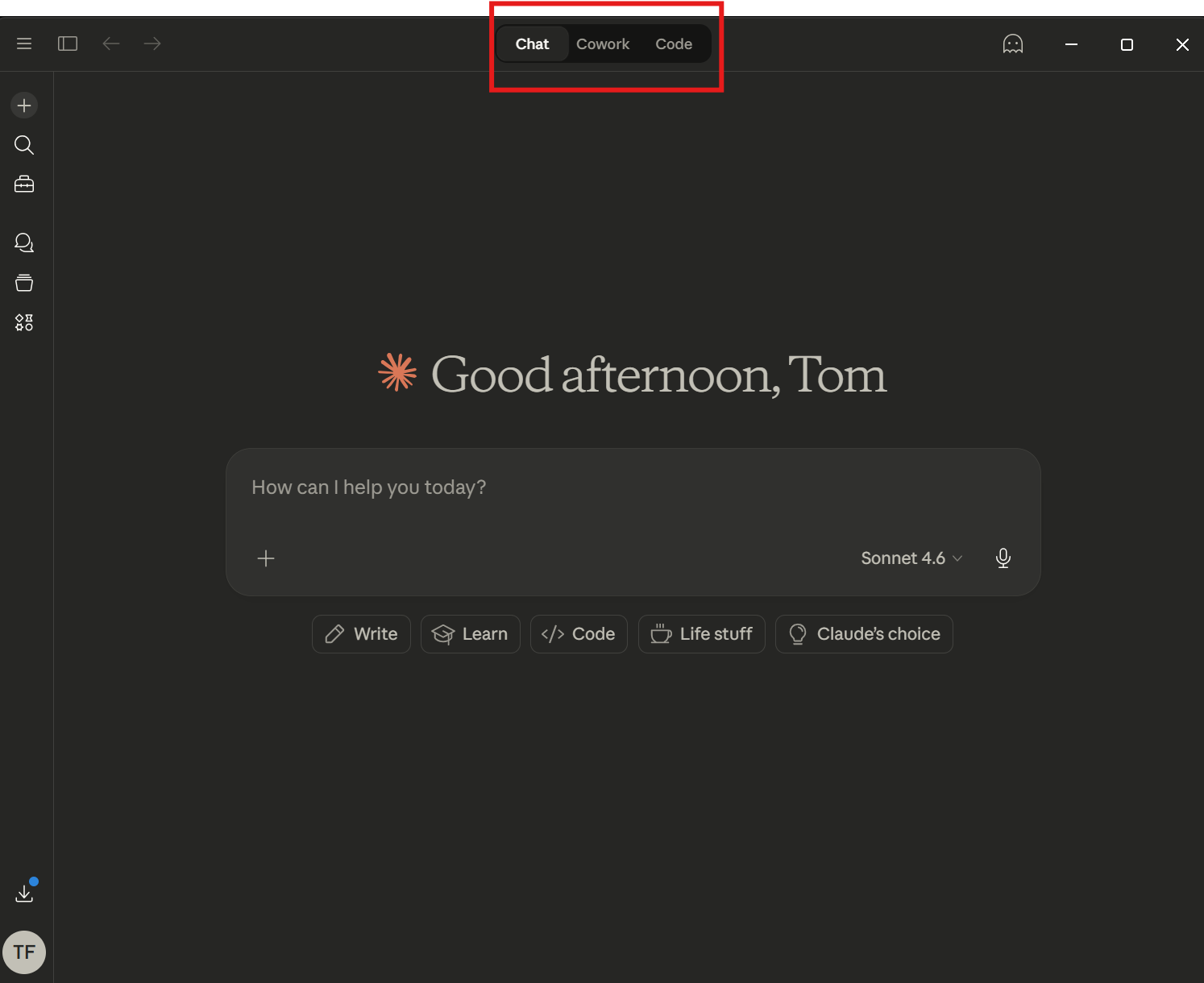
What it is: Claude's desktop app with three distinct modes: Chat (standard AI conversation), Cowork (AI with direct access to your computer's file system — powered by Claude Code under the hood), and Code (full Claude Code terminal for building and running software).
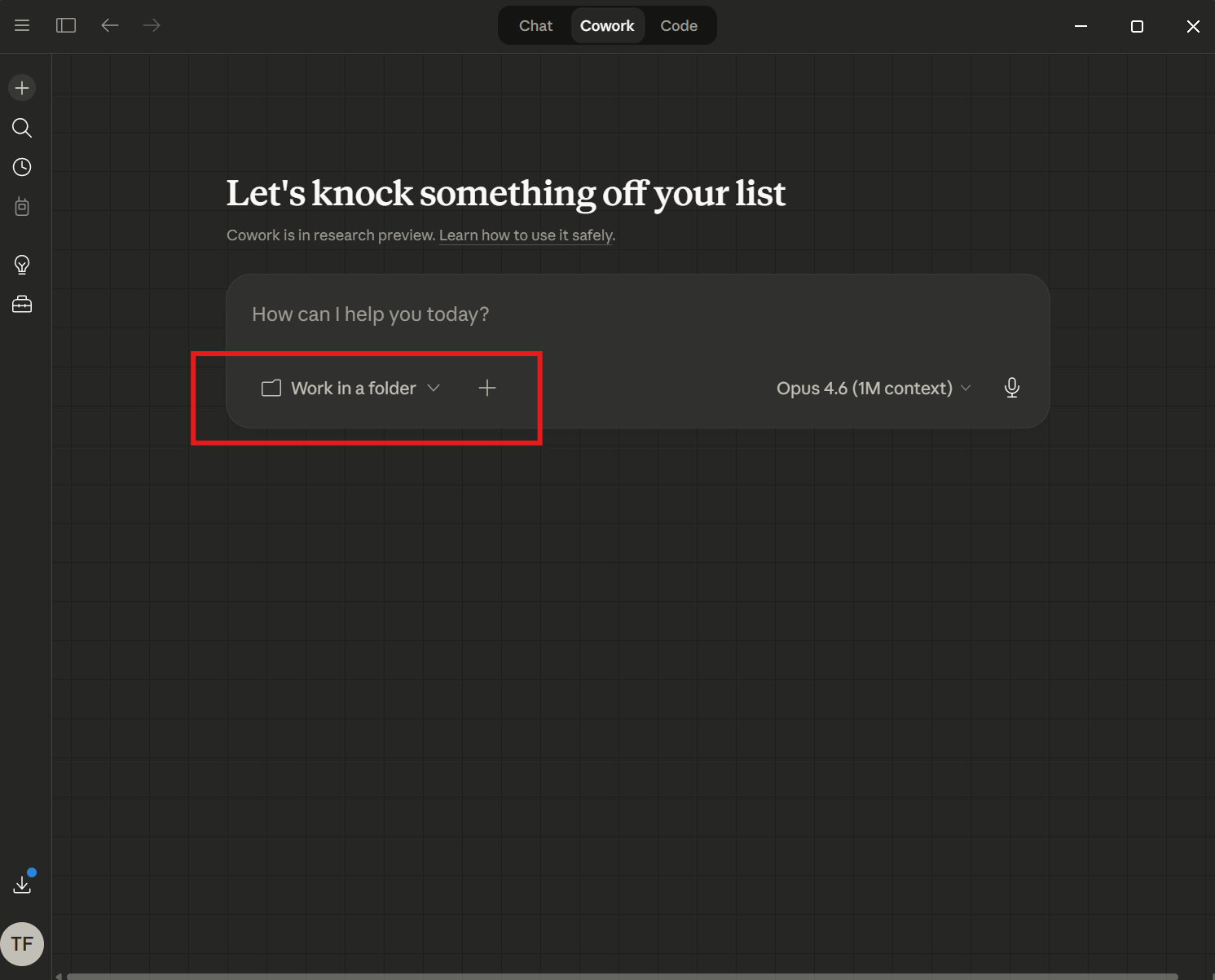
Why it matters: Cowork mode connects Claude directly to a folder on your machine — it reads your files, your documents, your projects — and works with your actual context. Claude Code powers the Cowork function, meaning the same AI that can build software is also the one reading and working inside your files.
Use it for: Summarizing documents, working across multiple files, drafting anything that requires real context from your actual work. For non-coders, Cowork is the mode to start with — point it at a folder and go.
🤖 Codex (OpenAI's Local AI Coding Agent)
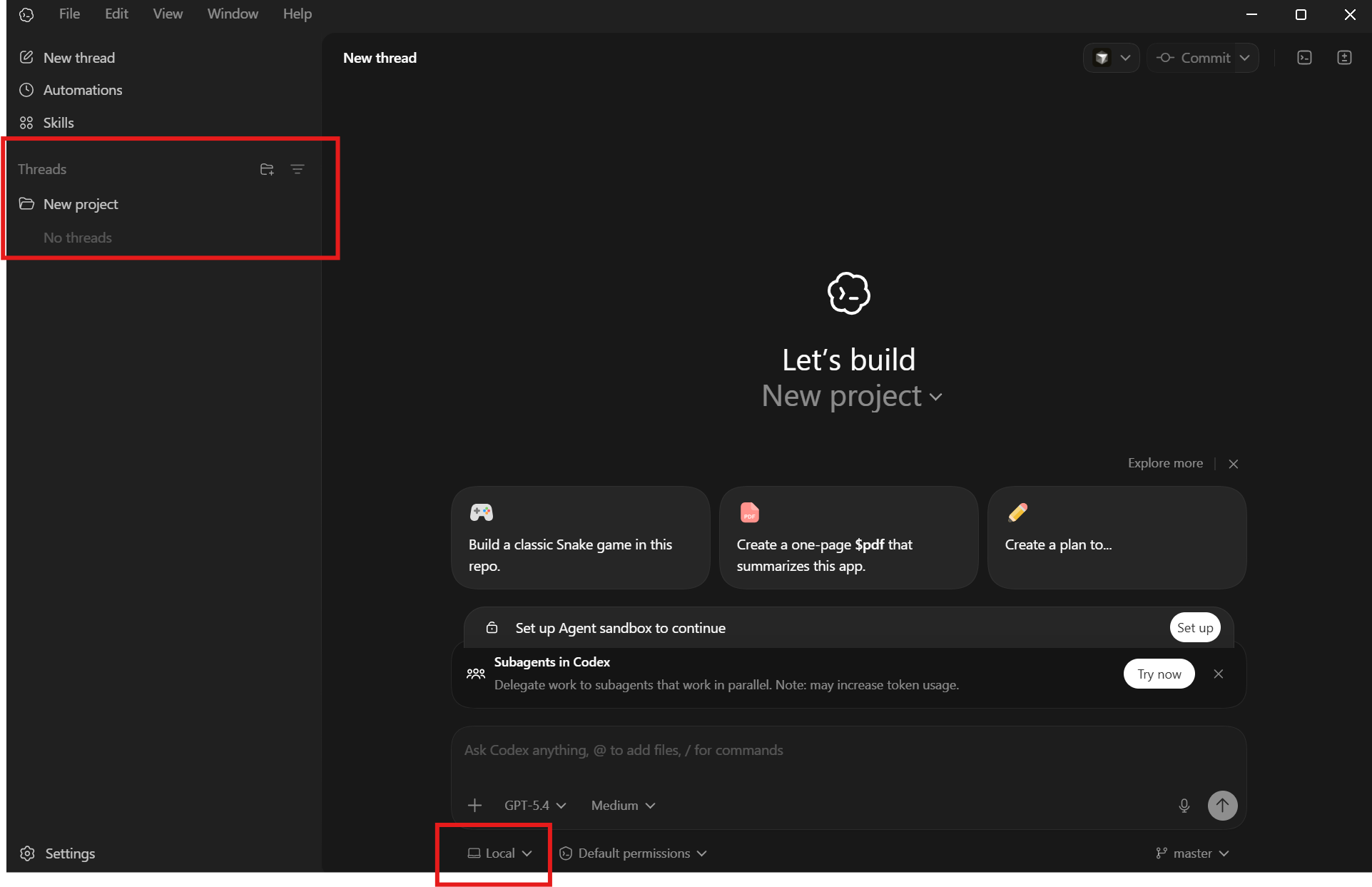
What it is: OpenAI's desktop coding agent — ChatGPT's answer to Claude Desktop. Codex runs locally on your machine, connects directly to your project files, and writes, edits, and builds software autonomously.
Why it matters for non-coders: If ChatGPT is already your primary AI, Codex is the most natural transition into local file work. Same familiar ecosystem — but now it can open a folder, read your files, run code, and build things without you writing a single line. "Subagents in Codex" lets it delegate tasks and work in parallel across your project.
Bottom line: If you live in ChatGPT, start here.
🪂 Antigravity (Google's AI Coding Agent)
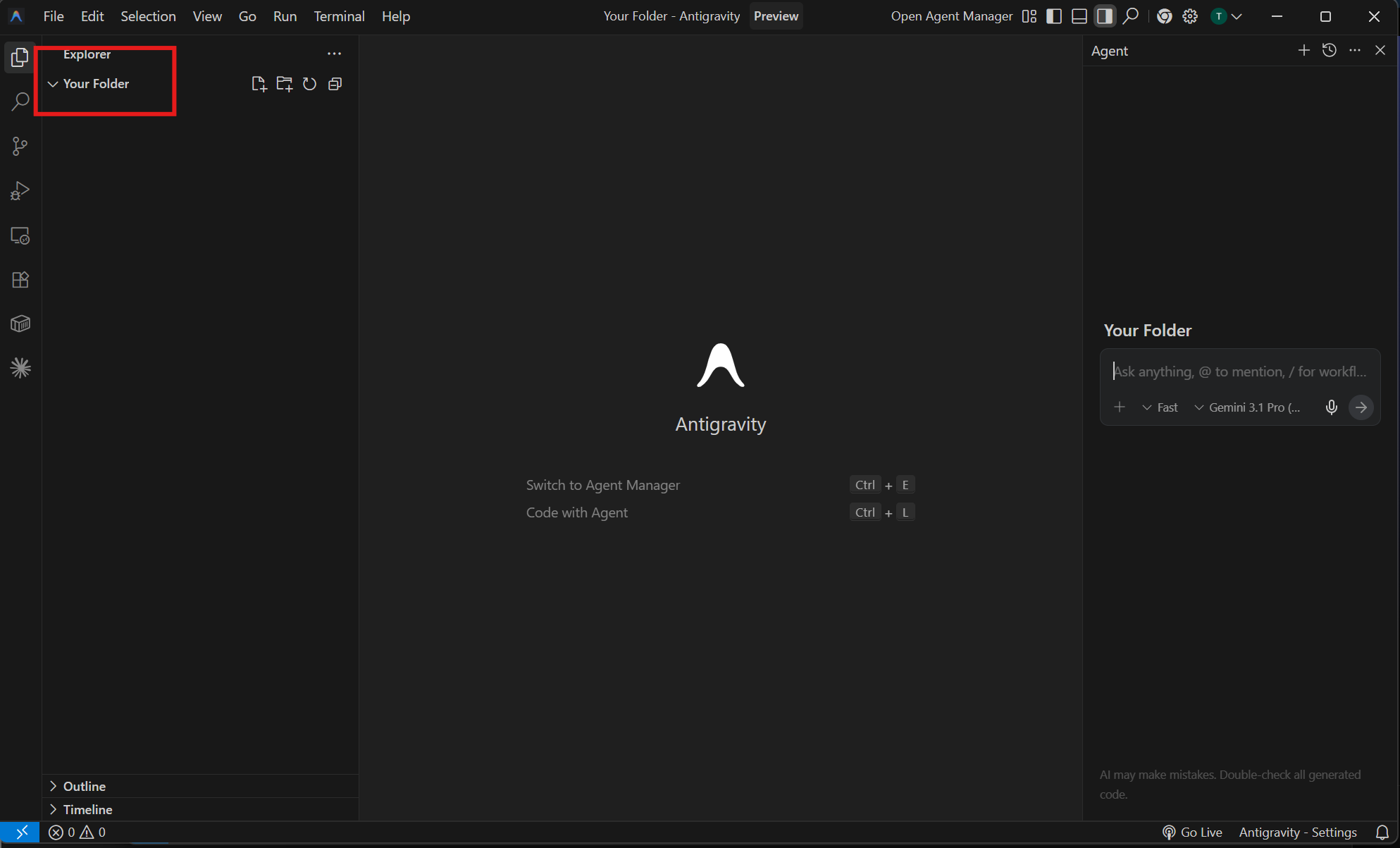
What it is: Google's VS Code-based desktop IDE with Gemini 3.1 Pro built in as an autonomous coding agent. Switch to Agent Manager for complex multi-step tasks, or use "Code with Agent" for inline pair programming.
Why it matters: Claude Desktop, Codex, and Antigravity are the three most capable AI harnesses right now. All three work without you knowing how to code. Antigravity lives on your desktop, has access to your full project folder, and can run multi-file agent tasks autonomously. If you're a Google/Gemini person, start here.
Other Tools Worth Knowing
Everything below has carved out a unique niche. Not listing things because they're new — listing them because they're here to stay.
📓 NotebookLM
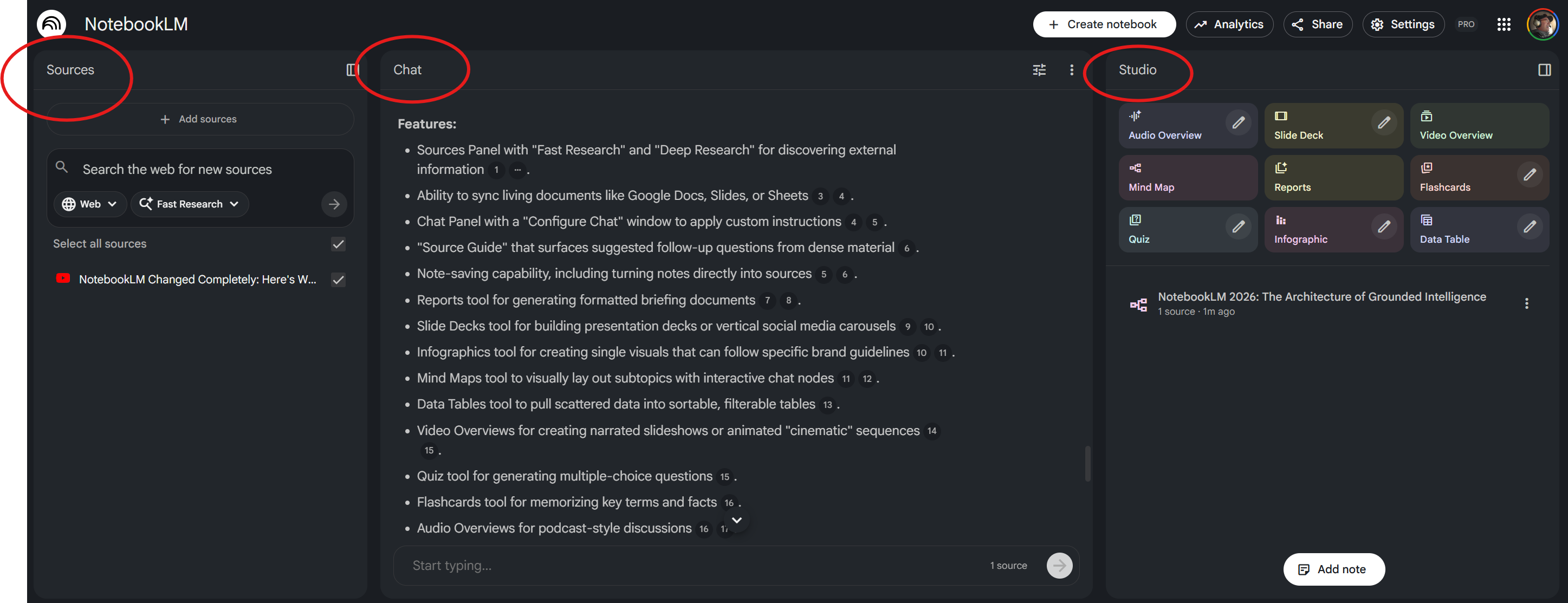
What it is: Google's AI research assistant. Feed it documents, PDFs, websites, YouTube videos — it reads everything and lets you have a conversation with your sources.
Why it matters: Three panels work together — Sources (feed it anything), Chat (ask questions across all your sources with citations), and Studio (generate audio overviews, slide decks, mind maps, infographics, quizzes). Imagine uploading 20 documents and asking questions across all of them simultaneously. The audio overview feature alone is worth it — dense content digested on a commute.
🌐 Browser Extensions: Claude + Gemini
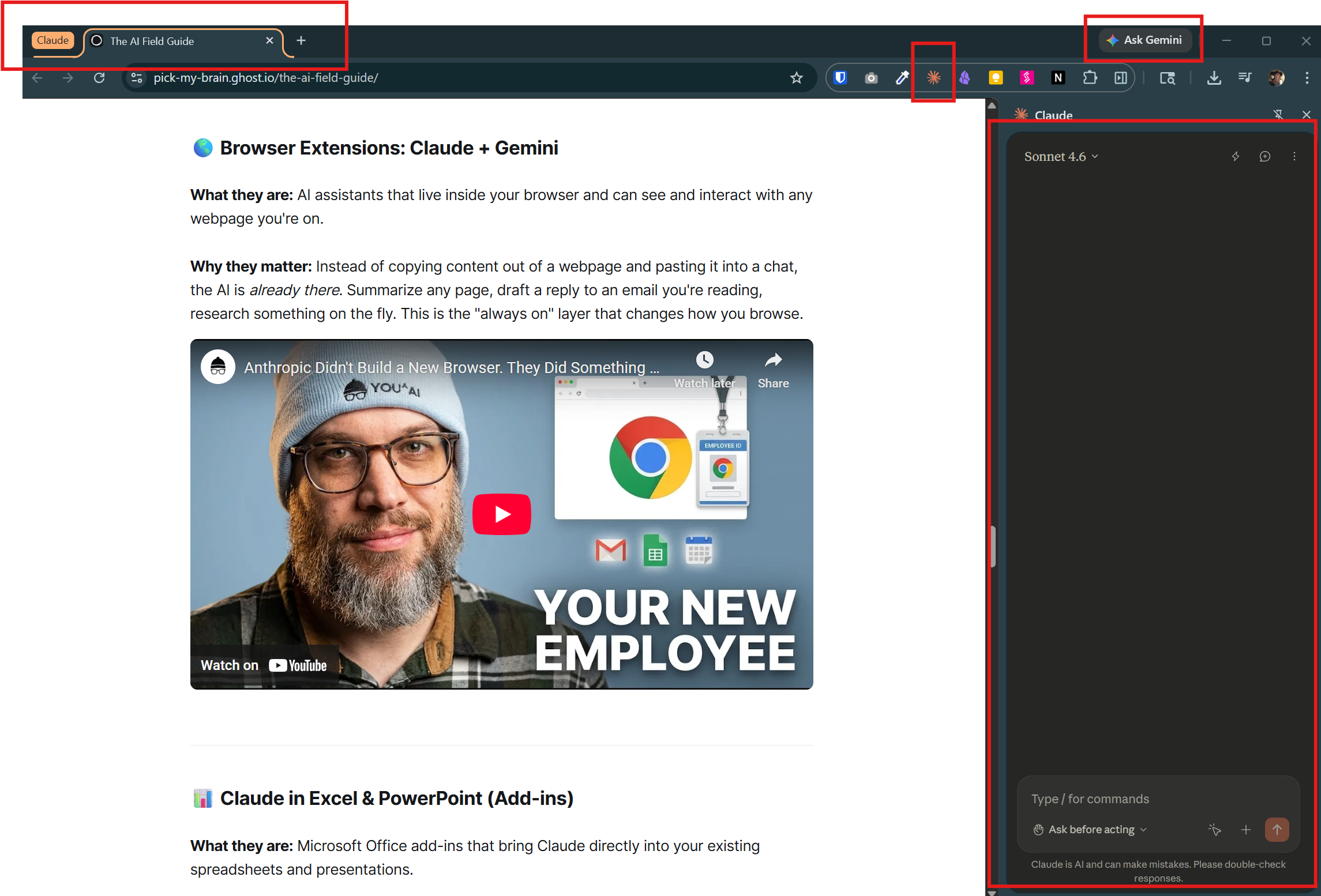
What they are: AI assistants that live inside your browser and can see and interact with any webpage you're on.
Why they matter: Instead of copying content out of a webpage and pasting it into a chat, the AI is already there. Summarize any page, draft a reply to an email you're reading, research something on the fly. This is the "always on" layer that changes how you browse.
📊 Claude in Excel & PowerPoint (Add-ins)
What they are: Microsoft Office add-ins that bring Claude directly into your existing spreadsheets and presentations.
Why they matter: You don't have to leave your workflow. Analyze data, generate slides, draft content — all from inside the tools you already use every day.
🎨 Image Generation: Nano Banana Pro
What it is: AI image generation powered by Google's Gemini 3 Pro.
Why it matters: The quality gap between AI-generated images and professional creative work has nearly closed. Useful for marketing materials, social content, presentations, and ideation. Full disclosure: the images in this post were generated with it.
🔧 My AI Operating System (OpenClaw + GoBot)
This is where I practice what I preach. I run a team of AI agents — one manages my messages, another handles research, another writes content, another tracks finances across all my businesses. They coordinate with each other autonomously. I curate. They operate.
The platform that makes this possible is called OpenClaw. GoBot and ClaudeClaw are my customized versions built on top of it. This is the harness concept taken to its logical extreme — not one AI assistant, but a full operating system of them working in parallel.
This is further ahead than most people need to be right now. But if you're curious where this is all heading for a non-technical person — this is it.
📸 Photo Digitization (Side Note)
A few of you asked about preserving memories from before the digital era. There's been an explosion of services that make this painless:
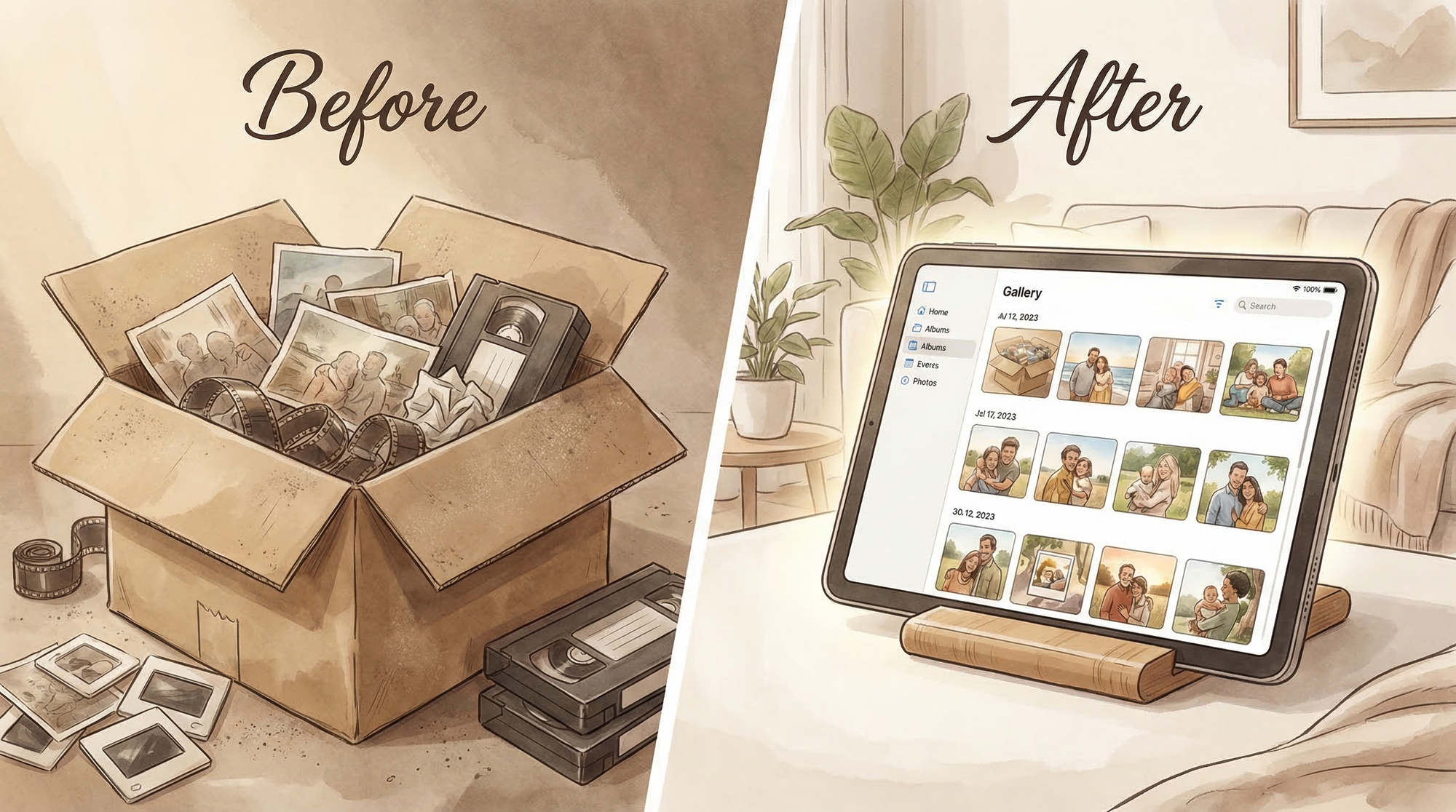
- The Digitize Center — Send a box. They digitize, organize, and return your originals.
- ScanMyPhotos — High-volume scanning, consistently well-rated.
- ScanCafe — Top-rated with good organization features.
📎 Download the DCC Slide Deck — Making AI Work for You (PDF)
Where AI Is Headed: The Big Picture
The Desktop is the New Frontier
ChatGPT desktop. Claude desktop. Gemini desktop. They're all here and they're all pushing hard. The reason this matters: filesystem access + persistent context + always-on availability = AI that actually knows your work instead of meeting you fresh every time. The harness concept scales from your laptop to your entire business.
Andrej Karpathy's AutoResearch
The most technically significant development since my talk. Karpathy (ex-Tesla AI, OpenAI founding member, now running Eureka Labs) open-sourced autoresearch — a tool that lets AI agents autonomously run experiments overnight. Give it a goal, it modifies code, tests, checks results, keeps or discards changes, and repeats. ~100 experiments while you sleep.
This is technical now, but the pattern — AI that improves itself without human intervention — is going to reshape every industry. Watch this to understand where it's going:
Who to Follow
This list is a starting point — not a prescription. Find the sources that resonate with you, follow them, watch their videos, and read the comments. Seriously — the gold is often in the comments. The algorithms are frighteningly good at learning what you care about. The more you engage with content that's relevant to you, the more powerful and tailored your feed becomes. Give it a few weeks of intentional use and your YouTube and X feeds will feel like a custom AI briefing built just for you.
📺 YouTube
| Channel | What You'll Get |
|---|---|
| Nate B Jones | Big-picture AI strategy. 20-year product leader. Best "what does this actually mean" commentary. |
| Greg Isenberg | Startup ideas + AI for building businesses. High energy, entrepreneurial. |
| Matt Wolfe | The tool guy. Runs FutureTools.io. Best for staying current without drowning. |
| How I AI | Hosted by Claire Vo. Practical AI for people at work. Copy-immediately workflows. |
| This Week in Startups | Jason Calacanis. AI in the context of business deployment. |
| Andrej Karpathy | The technical frontier. Watch to understand where this is heading 3 years from now. |
| Samin Yasar | Agent workflows and real implementations. |
| Mark Kashef | Practical builds, automation workflows. |
𝕏 (Twitter)
| Handle | Who | Why |
|---|---|---|
| @karpathy | Andrej Karpathy | Frontier research, high signal |
| @clairevo | Claire Vo | Practical AI, product-focused |
| @lennysan | Lenny Rachitsky | AI in product and business |
| @mreflow | Matt Wolfe | Tools and news |
| @AiBreakfast | AI Breakfast | Daily AI news digest |
| @twistartups | This Week in Startups | Business/deployment lens |
| @emollick | Ethan Mollick (Wharton) | Best "AI at work" research |
| @sama | Sam Altman | Low volume, high signal |
Go Deeper: Skool Communities
Skool is a community learning platform — curriculum, workshops, and forums in one place. My philosophy: I mostly recommend paid communities — skin in the game changes everything. But there's one free starting point worth knowing about.
| Community | Price | Best For |
|---|---|---|
| AI Automation Agency Hub | Free | Starting point. 300k+ members. Beginner-friendly templates. |
| OS Architect | $26/mo | Best value. Plug-and-play automation blueprints, weekly tool drops. |
| Early AI-dopters | $64/mo | Business-leader focused. Run by Mark Kashef. High signal. |
| AI Profit Boardroom | $59/mo | Revenue-focused. AI for lead gen, sales, automation. |
| Agentic Academy | $37/mo | Claude Code + n8n agent builds. Structured curriculum. |
My Workflow for Staying Current
- X and YouTube — where the newest information flows first. I use these to identify trusted voices and spot emerging tools before they hit mainstream coverage.
- Skool communities — for deep dives. YouTube/X content is usually a teaser; the Skool community has the full curriculum and live workshops.
- Build the habit — 10-15 minutes a day with AI beats a weekend crash course every six months.
Stay Updated
This is a starting point. Subscribe below and I'll send updates through this channel as the landscape shifts — not on a schedule, not as filler. Only when it's worth your time.
— Tom Filippini | Denver, CO | March 2026